Printable Protractor: How to Download, Print, and Use It Correctly
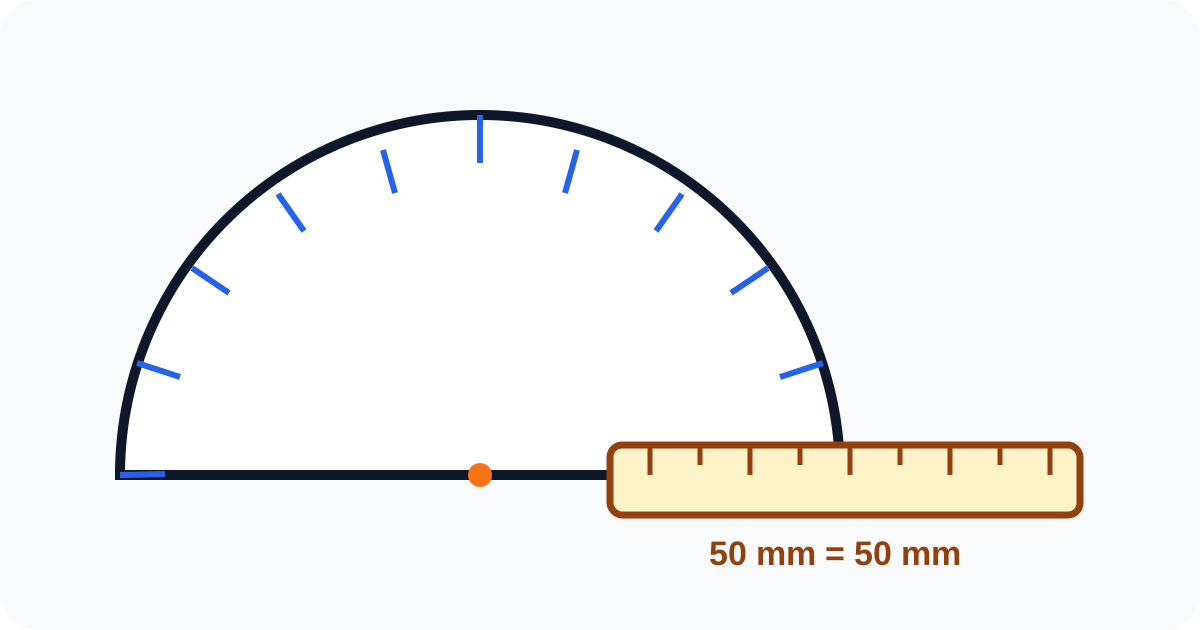
Sometimes, digital tools aren't enough. You might be in a classroom without tablets, working on a physical craft project, or simply prefer paper. If you don't have a plastic protractor handy, a printable protractor is a useful backup.
Printing a measuring tool has one major pitfall: distortion. Uniform scaling changes the physical size of the template but normally preserves its angles. Non-uniform scaling, paper warping, a shifted center, or a crooked baseline can change the geometry you actually align to the object. The calibration bar helps reveal print setup problems, but it is not a certificate of angular accuracy.
This guide will show you exactly how to print a protractor correctly and use it effectively. It also helps to remember that a printable protractor is a useful backup tool, not automatically the best choice for every measuring job.
Before You Print: Decide Whether Paper Is the Right Tool
A printable protractor works best when you need to measure something physical on paper or on a light craft surface. It is less ideal when:
- you need repeated, high-precision measurements,
- the material is thick, curved, or hard to hold flat,
- or the angle is already on a screen, PDF, or image file.
In those cases, switching to a digital tool can be faster and more reliable.
Step 1: Downloading the Right Template
Not all printable protractors are created equal. You want one that involves:
- High Resolution: So the tick marks are crisp, not blurry.
- Clear Center Point: Essential for aligning with the vertex.
- Two Scales: An inner scale (0-180 right to left) and outer scale (0-180 left to right) for versatility.
Also check whether the file was designed for A4 or US Letter paper. Even if the scale setting is correct, printing an A4 template on the wrong paper setup can shift margins and cut off important marks.
Choose the file that matches the paper selected in your printer dialog:
Both one-page files were created by Tyr for this guide and checked on August 15, 2026. They use vector lines, one-degree tick marks, two reading directions, a marked center, and a 50 mm calibration bar. The paper-size choice changes the page canvas and margins, not the angle scale.
Step 2: The Golden Rule of Printing (Do Not Skip!)
This is where most people mess up.
When you hit "Print" in Adobe Reader or your browser:
- Look for the "Page Sizing & Handling" or "Scale" setting.
- Avoid "Fit to Page" or "Shrink to Fit" when you want the template at its designed physical size.
- Select "Actual Size" or "Scale: 100%", then verify the printed calibration bar.
Why?
Printers usually leave a white margin around the paper. "Fit to Page" may shrink the document to avoid clipping. Uniform shrinkage alone does not change the mathematical angle between two rays, but it makes the template smaller than designed and can combine with printer or driver distortion. Printing at 100% gives you a known starting point and makes the calibration bar meaningful.
How to Check: These templates include a 50 mm reference line. Measure it with a ruler after printing. If it is not 50 mm, check paper size and scaling. Also compare the protractor against a known right angle, because a correct bar length cannot detect every possible skew or paper warp.
Common Printing Mistakes
Even when people know about 100% scaling, they still run into problems because:
- the browser print dialog keeps an old "fit" setting from another document,
- the selected paper size does not match the template,
- the printer adds unexpected margins,
- or the print preview already looks cropped but gets ignored anyway.
Always look at the preview before printing. If the semicircle, baseline, or reference line looks compressed or clipped, stop and fix the settings first.
Step 2.5: Quick Verification After Printing
Before you trust the tool, do a 30-second check:
- Measure the printed reference line with a real ruler.
- Check that the baseline is straight and not visibly warped by the paper.
- Make sure the center point is still exactly in the middle after cutting.
- Compare one familiar angle, such as a known right angle, to see whether the printed marks behave as expected.
If any of these checks fail, do not use that printout for an important result just because it is "close enough."
Example Print Verification Record
Record the checks instead of relying on the print preview:
| Check | Observed result | Decision |
|---|---|---|
| 50 mm calibration bar | 50 mm in both directions | Physical scale check passes |
| Known square corner | Aligns with the 90° mark | Basic angular sanity check passes |
| Baseline and paper | Flat, straight, not clipped | Suitable for a classroom or preliminary reading |
If the bar measures 49 mm, the template is about 98% of its intended physical size. That does not automatically make every angle 2% smaller, but it tells you the print path changed the file and deserves closer inspection.
Step 3: Making It Durable (Optional)
A piece of paper is flimsy. To make your printable protractor more usable:
- Cardstock: Print on heavy cardstock instead of standard office paper.
- Tape Trick: Cover the paper with clear packing tape before cutting it out. This acts like a poor man's lamination.
- Transparency Film: If you have an inkjet-compatible transparency sheet, print on that! You'll get a clear protractor just like a plastic one.
Step 4: Cutting and Using
- Cut Carefully: Use sharp scissors. The most important edge is the straight baseline at the bottom. This must be perfectly straight.
- The Center Notch: Use a pin or needle to poke a small hole exactly at the center crosshair. This allows you to place a pencil dot precisely at the vertex.
When using it, align the baseline with one side of the angle first, then confirm the center sits exactly on the vertex before reading the second side. Many measurement errors happen because the user lines up the numbers before lining up the center.
Common Reasons a Printable Protractor Still Gives a Bad Result
If the answer looks wrong, common causes include:
- the print was slightly scaled,
- the paper bent while you were holding it,
- the baseline was cut unevenly,
- the center hole drifted away from the real vertex,
- or you read the wrong inner/outer scale.
This is especially common with small angles, thick pencil lines, or classroom worksheets with rough printing quality.
When Should You Recheck or Switch Tools?
Recheck the result when:
- the reading is close to an important boundary such as
90°, - the worksheet or object is too large for the paper tool to sit flat,
- different measurements are supposed to match but do not,
- or accuracy matters more than convenience.
In those situations, it may be better to use our Online Protractor, a rigid physical protractor, or compare your estimate with angle classification basics before making a decision.
Printable vs. Online Protractor
When should you use which?
| Use Case | Printable Protractor | Online Protractor (Our Tool) |
|---|---|---|
| Homework on Paper | ✅ Best Choice | ❌ Hard to hold screen to paper |
| Measuring Objects (Wood, etc.) | ✅ Good (if flexible paper) | ❌ Impractical |
| Measuring Digital Images | ❌ Requires printing the image | ✅ Designed for upload and measurement |
| Measuring PDF Blueprints | ❌ Slow | ✅ Fastest |
If the source begins as a photograph or scan, review how stretching, perspective, line thickness, and center placement affect an image measurement before choosing between paper and browser workflows.
Conclusion
A printable protractor is a useful backup tool. Start at 100% scale, verify the 50 mm bar and a known right angle, and keep the paper flat while measuring.
If you are trying to measure something already on your screen, don't waste paper! Use our Online Protractor to measure it directly, or see how to measure angles in PDF for a more suitable workflow.
Sources and references
- Advanced PDF print settings — Adobe Acrobat Help
- SP 330 — Plane angles, solid angles and phase angles — National Institute of Standards and Technology